How to Write LinkedIn Posts That People Actually Read
Struggling with how to write LinkedIn posts? This guide shares proven frameworks, formatting tips, and real-world examples to boost your engagement.

To write a great LinkedIn post, you need to follow a simple, three-part flow. Step one is to snag attention with a scroll-stopping hook. Step two is to deliver valuable information in the main body. Finally, step three is to wrap up with a clear call to action (CTA). Nailing these three elements is the blueprint for creating content people actually stop to read and engage with.
The Anatomy of a High-Performing LinkedIn Post
What is the structure of a high-performing LinkedIn post? It’s not usually luck—it’s a clear structure. Before we get into advanced tactics, let's break down the fundamental anatomy of a post that gets results.
Think of this as the framework for turning your ideas into content that genuinely sparks conversations and, ultimately, drives business. Every single successful post has these three ingredients.
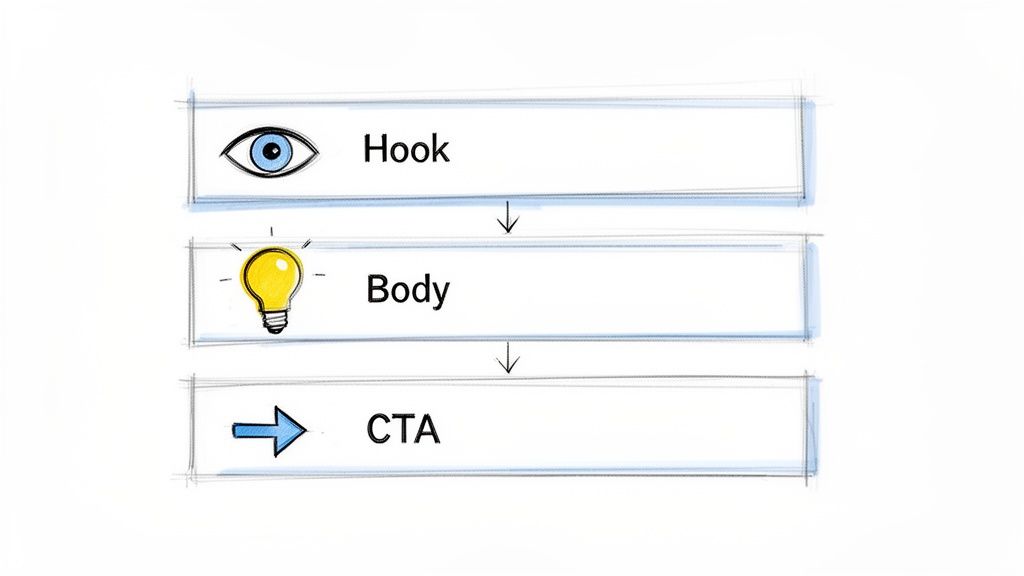
The Hook, The Body, and The CTA
At its core, a good LinkedIn post takes the reader on a quick journey. It piques their curiosity, offers them something valuable, and then tells them what to do next. This isn't just a formula; it’s how you structure a good conversation, respecting the reader's time from start to finish.
Let's look at the three pillars:
Step 1: The Hook: These are the first couple of lines—everything a user sees before they have to click "...see more." Its one and only job is to stop the scroll. If your hook fails, the rest of your post might as well be invisible.
Step 2: The Body: Here’s where you deliver on the promise you made in the hook. You might tell a story, share a hard-won insight, teach a quick lesson, or offer a fresh perspective. This is where you build trust and show you know your stuff.
Step 3: The Call to Action (CTA): This is the final step. What do you want the reader to do now? A post without a CTA is a dead end. It leaves the reader hanging, unsure what to do with the information you just gave them.
A great post doesn't just broadcast a message; it invites people in. The Hook asks for a moment of their time, the Body makes it worthwhile, and the CTA asks them to join the conversation.
To make this even clearer, here’s a quick-start guide to the essential parts of any successful LinkedIn post.
Core Components of an Engaging LinkedIn Post
This simple framework puts you in the driver's seat, guiding your audience through your content with a clear purpose for every word.
Why This Simple Structure Works So Well
Why is the hook-body-CTA model so effective? It mirrors exactly how we skim content on a busy social feed. We’re all making split-second judgments.
A sharp hook acts like a magnet, pulling in the right audience. The body delivers the substance that makes them glad they stopped, reinforcing your expertise. And finally, the CTA closes the loop, turning a passive reader into an active participant.
This last part is crucial. The LinkedIn algorithm loves posts that generate engagement, especially comments. A clear CTA that asks a question or prompts a specific action is what fuels a post's reach. By mastering this foundational structure, you lay the groundwork for everything else. The goal isn't just to be seen—it's to become a trusted voice.
If you want to see how top experts put this into practice, checking out some powerful thought leadership content examples can give you some fantastic ideas.
How to Write a Hook That Actually Stops the Scroll
What are the best ways to write a hook for a LinkedIn post? Think of your first two lines as an audition. You have about three seconds to convince someone to stop their endless scroll and give you their attention. If those lines don't land, your post is basically invisible.
This is especially true on a busy feed where everyone is vying for eyeballs. That little "...see more" link is your first finish line. Getting people to click it is everything.
The secret isn't just "being interesting." It's about using proven psychological frameworks that create an itch people have to scratch. Let's break down four of my go-to methods for writing hooks that work.
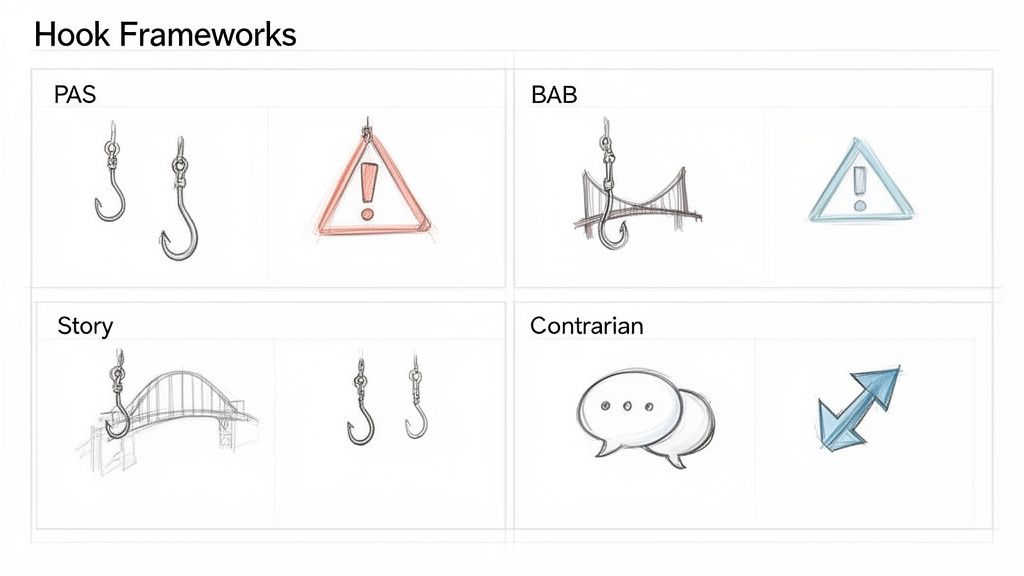
Hit a Nerve With the Problem-Agitate-Solve (PAS) Formula
The Problem-Agitate-Solve (PAS) formula is classic for a reason: it works. You’re tapping directly into a pain point your audience is actively trying to solve, which makes them feel like you’re reading their mind.
Here’s the step-by-step breakdown:
- Problem: Start by stating a clear, specific problem they face.
- Agitate: Pour a little salt in the wound. Describe the frustration or negative feelings that come with that problem.
- Solve: Hint that you have the answer they're looking for, which you'll reveal in the rest of the post.
Imagine a marketing consultant using this:
Problem: "Are your LinkedIn posts getting zero engagement?"
Agitate: "You spend hours crafting the perfect post, hit publish, and… crickets. It’s like shouting into the void and a total waste of your time."
Solve: "I helped a client 3x their comments last month just by fixing one small detail in their CTA."
This grabs them because it validates their struggle before offering a way out. It’s incredibly effective.
Paint a Picture With the Before-After-Bridge (BAB) Framework
People are drawn to transformations. The Before-After-Bridge (BAB) framework is all about selling a better future and positioning your advice as the path to get there.
Here is the process:
- Step 1 (Before): Start with the pain of manual cold outreach and single-digit response rates.
- Step 2 (After): Describe a calendar packed with inbound meetings from qualified leads.
- Step 3 (Bridge): Explain the specific content strategy that made it happen.
This works because you’re not just sharing information; you’re selling a vision.
Create an Instant Connection With a Story Hook
We're all hardwired for stories. A story hook bypasses the logical, professional part of the brain and creates an immediate emotional connection. Facts tell, but stories sell.
Instead of a bold claim, you drop the reader right into the middle of a moment. It could be a snippet of a conversation, a personal failure, or a surprising win.
"My biggest client fired me over a Zoom call. It was brutal. But it taught me the most valuable lesson about client retention I've ever learned."
An opening like this creates what’s called an "information gap." The reader's brain naturally wants to fill it. They need to know what happened next and what the lesson was. It feels real, authentic, and memorable.
Challenge the Status Quo With a Contrarian View
Sometimes the best way to get noticed is to zig when everyone else zags. A contrarian hook directly challenges a common belief or piece of advice in your industry.
This tactic forces people to stop and reconsider what they thought they knew, immediately positioning you as someone who thinks differently. It’s not about being controversial for shock value; it’s about offering a fresh perspective.
Compare these examples:
- Standard Hook: "To grow on LinkedIn, you should post content every day."
- Contrarian Hook: "Everyone says to post daily on LinkedIn. They're wrong."
- Standard Hook: "My best tip is to always 'add value' in your posts."
- Contrarian Hook: "Stop trying to 'add value.' You should be doing this instead."
A contrarian hook signals that your post contains an unconventional insight, making it irresistible for anyone tired of the same old tips. It’s one of the fastest ways to stand out from the crowd.
Crafting the Body of Your Post: From Attention to Trust
Now that you've written a killer hook, how do you write the body of the post? This is where you have to deliver on the promise you made in those first couple of lines.
The body of your post is the meat and potatoes. It's where you shift from grabbing attention to holding it, proving you're someone worth listening to. But you can't just throw a wall of text at people scrolling on their phones. You need to lay out your story in a way that’s as easy to read as it is valuable.
Keep It Scannable with Short Paragraphs
If you take only one thing away from this section, let it be this: keep your paragraphs short. Seriously. One to three sentences is the sweet spot. This isn't your college thesis; it's content designed for a fast-moving mobile feed.
Short paragraphs create precious white space. Think of it as visual breathing room for your reader. It makes your post look less intimidating and way easier to scan.
For instance, compare the following formats.
Dense Paragraph (Hard to Read):
"Yesterday, I was on a sales call with a prospect who was hesitant about our pricing, and it reminded me of a common mistake many founders make. We often get so caught up in defending our value that we forget to listen to the underlying fear, which in this case was not about the price itself but the risk of a bad investment and the potential for a negative ROI."
Short Paragraphs (Easy to Read):
"Hopped on a sales call yesterday with a prospect who was getting cold feet about our pricing.
It reminded me of a classic founder mistake.
We get so caught up defending our value that we forget to listen to what they're really afraid of.
It wasn't about the price. It was about the risk of making a bad investment."
The second version is instantly more digestible and conversational.
Deliver Real Value to Build Credibility
The middle of your post has to have a clear purpose. Are you sharing a personal story? Walking through a framework? Unpacking a hard-won lesson? This is your chance to demonstrate your expertise without just shouting, "I'm an expert!"
Here are a few proven ways to deliver value:
- Tell a Personal Story: Talk about a time you failed or a surprising win you had. Stories forge an emotional connection and make your advice stick.
- Give a Mini-Tutorial: Break down a complicated process into a handful of simple, actionable steps. This immediately positions you as a helpful authority.
- Share an Insightful Observation: Offer a fresh take on a new industry trend or a common problem everyone in your network is wrestling with.
The secret is to give away your knowledge, experience, or perspective for free. That generosity is what turns casual scrollers into a loyal audience.
Your goal isn't just to share information; it's to spark an "aha" moment for the reader. The best posts make people feel smarter just for having read them.
Create a "Turn" to Make Your Point Land
A great storytelling trick is to introduce a "turn" in your narrative. This is the moment where you shift gears, challenge a common belief, or reveal the core insight of your entire post. It’s the pivot from the "what" to the "so what."
The turn often kicks off with a simple transition:
- "But then I realized..."
- "What I actually learned was..."
- "The real issue wasn't X, it was Y."
This little narrative twist builds a moment of suspense and makes your conclusion feel earned. It transforms a boring list of facts into a compelling story—a critical skill when you're learning how to write LinkedIn posts that people actually remember.
Find and Stick to Your Authentic Voice
Finally, and this might be the most important part, your post needs to sound like you. Authenticity isn’t just a buzzword; it’s the foundation of trust on social media. Ditch the stiff corporate jargon and, whatever you do, avoid that generic, robotic tone.
Your unique voice is a mix of a few things:
- Tone: Are you witty and direct? Empathetic and supportive? Analytical and data-driven?
- Rhythm: Do you prefer short, punchy sentences or longer, more flowing ones?
- Vocabulary: What words and phrases do you use that are specific to you or your industry?
A great acid test is to read your post out loud before hitting publish. If it sounds like something you’d never actually say in a real conversation, it’s time for a rewrite. In a sea of content, your authentic voice is what makes you stand out and turns followers into a community.
Choosing the Right Post Format and Visuals
What is the best format for a LinkedIn post? Once you’ve nailed the storytelling, it's time to think about the packaging. The format you choose—whether it’s a simple text-only update, a powerful image, or a multi-page document—is just as crucial as the words themselves. Different formats achieve different things, and picking the right one can seriously amplify your message.
Think of it this way: a great visual doesn’t just decorate your post. It communicates value before anyone even reads the first sentence. It can make a complex idea easy to grasp, add a human touch to a personal story, or just be the thing that stops a scroller in their tracks.
Comparing Popular LinkedIn Post Formats
Not all formats are created equal. Some are built for deep engagement, while others are better for broad reach. Your choice should always ladder back to the goal of your post. Are you trying to teach something, spark a debate, or share a quick win?
Here’s a breakdown comparing the most common formats and their best use cases:
If you’re looking for more inspiration on what to actually share within these formats, our guide on what to post on LinkedIn has a ton of ideas.
Let Data Guide Your Format Choice
You can get a serious edge by paying attention to what the LinkedIn algorithm is favoring right now. The data shows some clear winners.
For instance, native documents (carousels) now lead in engagement by impressions, with a 6.10% average engagement rate. Video posts have also seen a huge surge, jumping to a 5.60% average engagement. Want more comments? I’ve found that creating custom collages with 3-4 images can generate 2x higher engagement than a post with just a single image.
And if you’re feeling bold, live video generates a staggering 7x more reactions and 24x more comments than pre-recorded videos.
This infographic shows how to structure a compelling story, no matter which format you choose.
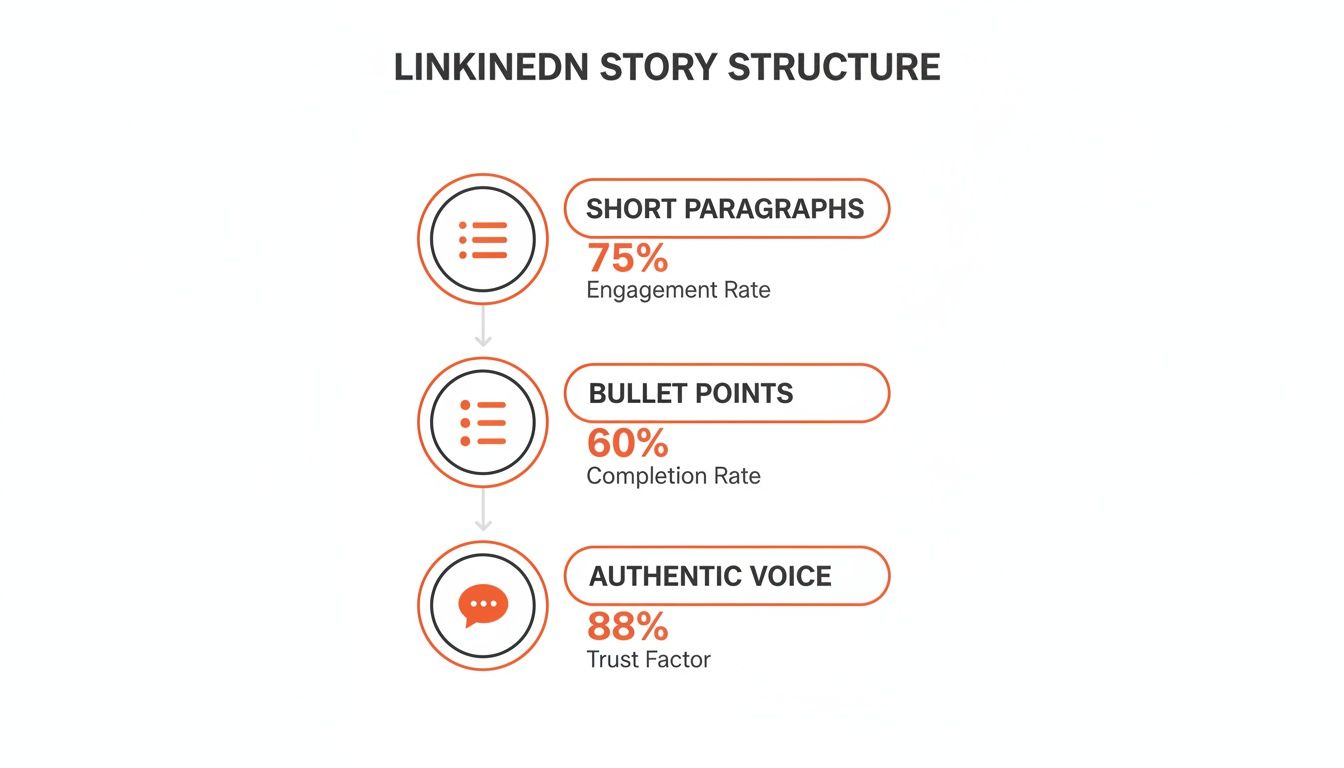
The takeaway is clear: combining short paragraphs, scannable bullet points, and an authentic voice is the secret to holding your reader's attention.
Tips for Creating High-Impact Visuals Without a Designer
How can I create visuals for LinkedIn without a designer? You absolutely do not need a design team. With a couple of simple tools and a bit of thought, you can produce professional-looking graphics that make your content shine.
The best visual isn't always the most polished one. Often, an authentic, behind-the-scenes photo or a simple, clear screenshot can be more effective than a stock image because it feels real and builds trust.
Here are a few steps to create your own visuals:
- Step 1: Use Canva. This tool is a game-changer. It’s packed with thousands of templates made for LinkedIn, so you can create branded carousels, quote graphics, and data charts in minutes.
- Step 2: Take Your Own Photos. A clean, well-lit photo of you, your team, or your workspace adds a human element that stock photos just can’t match.
- Step 3: Create Simple Text-Based Images. Use a simple app to put your hook or a key quote on a solid-colored background. It’s a dead-simple but surprisingly effective way to make your main point pop in the feed.
Getting Your Posts Seen: Hashtags, Tagging, and Timing
You can write the most brilliant post in the world, but if no one sees it, it doesn't matter. Getting your content in front of the right eyeballs is the other, equally important, half of the equation. This is where you learn to work with the LinkedIn algorithm, not against it.
Let's get into the nitty-gritty of how to do that. It really boils down to three things: a smart hashtag strategy, tagging people correctly, and knowing when to hit "post."
How to Actually Use Hashtags on LinkedIn Today
What is the best hashtag strategy for LinkedIn? Forget the old approach of cramming in a dozen tags hoping one will stick. That's dead.
These days, the sweet spot is 3-5 highly relevant hashtags. This focused approach is so much more effective. It tells the algorithm exactly what your content is about and who it’s for, instead of confusing it. Too many tags just looks spammy and can actually hurt your reach.
Here’s a simple three-step framework for choosing hashtags:
- Step 1: Use 1-2 Broad Tags. Think of these as the big categories. They're popular, high-volume tags for your industry, like #Marketing or #SaaS. This casts a wide initial net.
- Step 2: Use 1-2 Niche Tags. This is where the magic happens. Get specific with tags like #ContentStrategy or #B2BLeadGen. These connect you with a much more targeted, engaged community.
- Step 3: Use 1 Branded Tag. Create a unique hashtag for your business or personal brand, like #BrewbrandTips. Over time, this builds a searchable library of all your best content.
A targeted hashtag strategy is like giving the algorithm a clear set of directions: "This post is for people interested in X, Y, and Z." It’s all about precision, not just spraying and praying.
Finding the right tags takes a little digging, but it's worth it. Just pop a keyword into the LinkedIn search bar and see what hashtags it suggests. Take a look at the follower counts—I've found a mix of big, popular tags and smaller, more niche ones tends to work best.
Tagging People and Companies (Without Being Annoying)
Tagging other people or companies is one of the fastest ways to expand your post's visibility. When you tag someone, your post has a chance of showing up on the feeds of their connections. But there’s a very fine line between smart networking and just being spammy.
The golden rule is simple: Only tag people or companies who are genuinely part of the conversation.
When to Tag vs. When to Back Off
Finding the Best Time to Post on LinkedIn
What is the best time to post on LinkedIn? When you publish can have a massive impact. You want to post when your audience is actually online. While there's no single "magic hour" that works for everyone, decades of data show some clear patterns.
Generally speaking, the best times to post on LinkedIn are midweek, during business hours.
- Tuesdays, Wednesdays, and Thursdays are usually the strongest days.
- The prime time slots are often between 8 AM and 11 AM.
This just makes sense. People are settling into their workday and catching up on their feeds. Mondays are often a blur, and by Friday afternoon, many people have mentally checked out.
But treat this as a starting point, not a hard-and-fast rule. The best time for you depends entirely on your audience. If you’re targeting tech folks on the West Coast, posting at 8 AM ET is too early. Dive into your own LinkedIn Analytics to see when your past posts got the most traction. Test different days and times, and let your own data be your guide.
Turning Consistent Posting Into Real Growth
How do I grow on LinkedIn through posting? The real secret isn't a one-off viral hit. It's consistency.
Think of it like going to the gym. One great workout is nice, but it’s the habit of showing up week after week that actually builds strength. The same exact principle applies to feeding the LinkedIn algorithm and nurturing a loyal audience.
This isn't just a hunch; the data tells a clear story. According to LinkedIn's own research, company pages that post weekly see 5.6x more follower growth than those that only show up sporadically. What’s more, 40% of LinkedIn visitors engage with company pages every week, proving that a steady drumbeat keeps your brand top of mind. For more stats like these, check out Buffer's research on LinkedIn engagement.
Building a Sustainable Posting Habit
For busy professionals, the thought of posting consistently can feel completely overwhelming. The trick is to build a sustainable workflow, not a frantic content sprint that just leads to burnout.
Here is a simple, step-by-step process:
- Start Small: If you’re currently posting once a month, trying to jump to daily posts is a surefire way to fail. Instead, commit to one solid, high-quality post per week.
- Use a Content Calendar: A simple spreadsheet can be a lifesaver. By mapping out your topics a few weeks ahead, you kill the stress of "what do I post today?" We've got a great starting point in our guide to creating a LinkedIn content calendar template.
- Scale Up Slowly: Once one post per week feels like second nature, you can scale up to two or three.
The most successful people on LinkedIn aren't always the ones with the most brilliant ideas every single day. They're the ones who built a system that allows them to show up, without fail, week after week.
Refining Your Strategy with Simple A/B Tests
Once you've got a good rhythm going, it's time to start optimizing. You don’t need fancy software to figure out what your audience loves. Simple A/B testing is a powerful way to let your own data guide your content strategy.
A/B testing just means changing one single variable between two similar posts to see which one performs better.
Here’s how you can put this into practice:
- Test Your Hooks: Post the same core idea on two different days, but lead with a different hook. Compare a question hook vs. a contrarian statement hook to see which gets more comments.
- Experiment with Formats: Share a key insight as a text-only post one week. A few weeks later, repackage that same insight into a simple carousel (as a PDF). Compare the engagement on both.
- Vary Your CTAs: Does a post asking a direct question get more comments than one asking people to share their own experiences? Try different calls to action to see what really sparks a conversation.
Just track the results in your content calendar. After a month or two, you'll have real data on what works for your audience, helping you double down on the winning formulas.
Tracking Metrics That Actually Matter
It’s way too easy to get caught up in vanity metrics like likes and views. They feel good, sure, but they don't always translate into business results. To measure the real impact of your time on LinkedIn, you have to look a little deeper.
Focus on these key indicators that signal genuine interest and potential opportunities:
- Profile Views: An uptick in profile views right after you post means your content was compelling enough to make people curious about you.
- Inbound Connection Requests: Are people you don't know trying to connect? Pay close attention to any notes they include—they often reveal which post resonated.
- Inbound Messages: This is the big one. When your posts prompt qualified people to slide into your DMs to ask about what you do, you know your content is hitting the mark.
- Comment Quality: Don't just count the comments; read them. Are people asking thoughtful questions or sharing detailed stories? High-quality engagement is the sign of a healthy community.
Got Questions About Writing on LinkedIn? I've Got Answers.
Even after you've got a solid plan, a few specific questions always pop up once you start creating content consistently. Let's tackle some of the most common ones I hear from people just getting their footing on the platform.
How Long Should My LinkedIn Posts Be?
LinkedIn gives you a generous 3,000 characters, but the sweet spot is usually between 1,200 and 1,600 characters—that's about 200 to 250 words. This gives you enough room to tell a meaningful story without making your reader’s eyes glaze over.
However, the most critical part is the very beginning. You only get about 210 characters before LinkedIn hides the rest behind a "...see more" link. If you don't grab their attention in those first two lines, the rest of your post might as well not exist.
What’s the Best Format for a LinkedIn Post?
There's no single best format; the right choice depends on your goal. The real pro move is to mix things up to keep your content fresh.
- For Storytelling: Use text-only posts. They feel personal and direct.
- For Education: Use carousels (PDFs). They're perfect for breaking down complex topics or step-by-step guides.
- For Engagement: Use images. A post with a great photo or a collage of 3-4 images almost always gets more eyeballs.
- For Connection: Use video. It’s perfect for tutorials, quick tips, or giving people a behind-the-scenes look at your work.
My advice? Try them all. Pay attention to your analytics and see what your audience actually responds to.
Should I Use AI to Write My LinkedIn Posts?
Yes, but with a major warning. AI can be an amazing creative partner, but it should never be the final author. It's brilliant for bouncing ideas around, coming up with different hooks, or smoothing out an awkward sentence.
Think of AI as a tool to smash through writer's block, not as a content factory.
The single worst thing you can do is copy and paste whatever an AI spits out. The posts that truly connect are the ones dripping with your personal experience and unique perspective. Always, always rewrite AI content to sound like you.
Use AI to get started, but your voice is what makes people follow you. Don't let a machine silence it. The goal isn't to sound like a robot; it's to sound like a more efficient version of yourself.
If you want to sound like yourself—not a generic AI—Brewbrand learns your unique voice from your past content to generate authentic posts in under two minutes. It's designed for professionals who need to post daily without sacrificing credibility. Start writing 10x faster and reclaim your time with Brewbrand.
Generate LinkedIn content easier than ever before
Lorem ipsum dolor sit amet, consectetur adipiscing elit. Lorem ipsum dolor sit amet, consectetur.